
Role
UX/UI Designer
1 Month
Chat finance agent that tracks spending habits to give personalized financial advice. I primarily used Google Gemini to generate conceptual financials and charts data which I then adjusted in Figma.
Note:
Not fully functional. Only showcases how agent would work based on recommended prompts and questions after clicking screen.

CONTEXT
What inspired my project?
While I was talking with friends, I learned some of them have a hard time understanding their personal finances. They explained to me they want to save more, but don’t know where to start when they look at their accounts. I decided it would be a fun conceptual idea and experiment on how I could design a simple prompt AI tool for something like a bank app or spending tracker. I had this idea in mind as a concept once the agent has access to the financial information to help supplement and further explain a personalized financial strategy.
CHALLENGES
What are the User Needs?
Simplified jargon - Users may not completely understand a lot of the financial language used when explaining financial information. Therefore, the language needs to be easy to understand without any unnecessary jargon that may complicate the explanations.
Data visualizations - What users have mentioned is they sometimes find it easier to see a visualization of their finances instead of reading a chat summary since it helps them understand where they may need to improve compared to other categories.
Intuitive for all user levels - Since users tend to have different levels of understanding personal finances and financial technology, it’s important both the information and UI are seamless enough that they can understand how to use the chat prompt agent at a glance.
CHALLENGE
Designing a personal financial AI agent that can simplify complex personalized strategies to help users understand and improve their personal finances.
DESIGN DECISIONS
Deciding the core aspects.
Suggested Prompts.
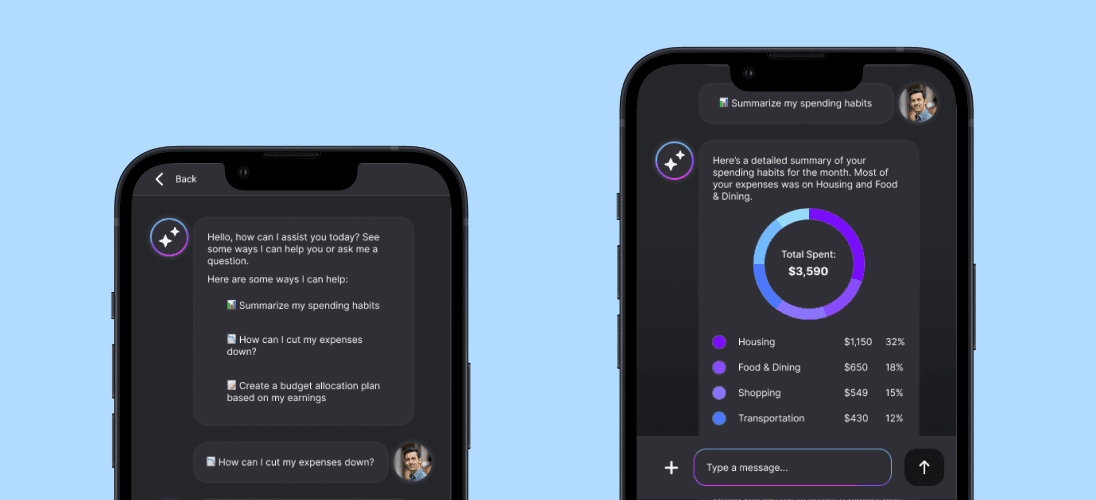
Users want to understand their finances, but may not know where to start if their new to personal financial management. So, for the prototype, I provided some example prompts that users can try selecting at first so they can understand how it works. Once they get used to using the agent with suggested prompts, they can enter their own prompts to get suggestions. It also provides suggestions for each result in case users prefer to keep using the suggestions.

Chat bar UI.
To keep the UI simple, there are only three elements of the chat bar: attach files button, chat bar, and the submit button. The attach button allows users to attach files that could help provide more in-depth information. These could include screenshots, spreadsheets, and additional files users feel may help. The submit button uses an upwards arrow to indicate that it will send the prompt to the AI agent on the main screen.

Data Visualizations.
In order to supplement statistic heavy suggestions, I wanted to incorporate data visualizations to help users visual the data. By using simple visualizations with recognizable upwards and downwards trending arrows, it can help users understand what they need to address. I’ve also included percentages with some financial categories since while users may see the amounts, they can also see how it relates to all their financials. For the type of visualizations, I decided not to include complex data charts, and used only common charts like pie charts and bar graphs.
THANK YOU FOR READING MY SHOWCASE!
Final Notes
After working on this project, I’ve found that it can be a challenge to create suggestions that are simplified since there may be a limited amount of space, especially on a mobile app. In the future, I’d like to add on more complex options to the agent rather than focusing on only suggested prompts. I’d also like to try creating more complex agentic tools for brokerage and wealth management accounts that require more intricate details, information, and tools.